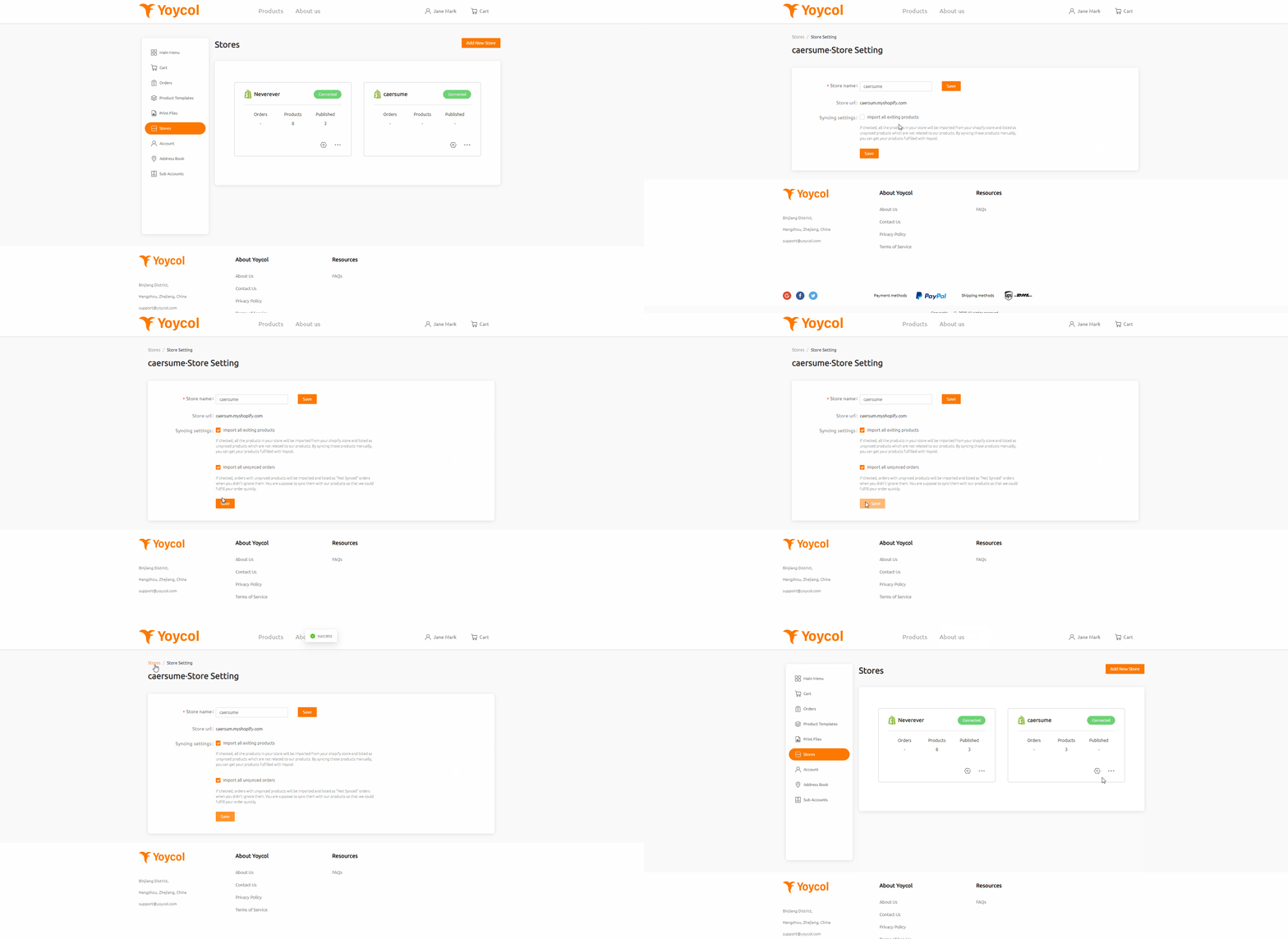
From your dashboard, you can manage your store after integrating. Go to Stores->Setting icon->Syncing settings.
If you want to manage all your products on Yoycol, you could check "Import all existing products". After checking it, you will find all the products in your shopify store are being imported.
Before you check "Import all unsynced orders", Yoycol will only import orders with synced products, ignoring unsynced products automatically. If you want Yoycol to fulfill your products, you could check it.

FAQS
Getting Started
Products & Pricing
Design & Mockups
Place Order
Shipping & Fulfillment
Returns
Integration
Account
Billing & Taxes
Resources
Personalization
Shopify - How to change orders imported setting?
From your dashboard, you can manage your store after integrating. Go to Stores->Setting icon->Syncing settings.
If you want to manage all your products on Yoycol, you could check "Import all existing products". After checking it, you will find all the products in your shopify store are being imported.
Before you check "Import all unsynced orders", Yoycol will only import orders with synced products, ignoring unsynced products automatically. If you want Yoycol to fulfill your products, you could check it.