Great designs deserve great presentation. And in the world of print on demand, mockups are everything.
A professional mockup can be the difference between a sale and a scroll-past. For all-over-print products especially, where designs cover the entire garment, mockups need to show customers exactly what they'll receive — vibrant colors, edge-to-edge patterns, and realistic fabric textures.
But creating AOP mockups isn't as simple as slapping a design on a blank t-shirt template. All-over-print requires specialized tools and techniques to accurately represent how patterns wrap around seams, stretch with fabric, and look in real life.
This guide covers everything you need to know about creating professional AOP mockups:
- Why mockups matter more for AOP products
- The best tools for creating AOP mockups (free and paid)
- Step-by-step techniques for realistic presentations
- Common mistakes to avoid
- Platform-specific tips for Etsy, Shopify, and social media
If you're new to all-over-print design, our AOP design templates guide covers file requirements and design principles. And if you want to understand the difference between mockups and real samples, our 3D mockup vs product sample guide explains when to use each.
Why Mockups Matter More for AOP Products
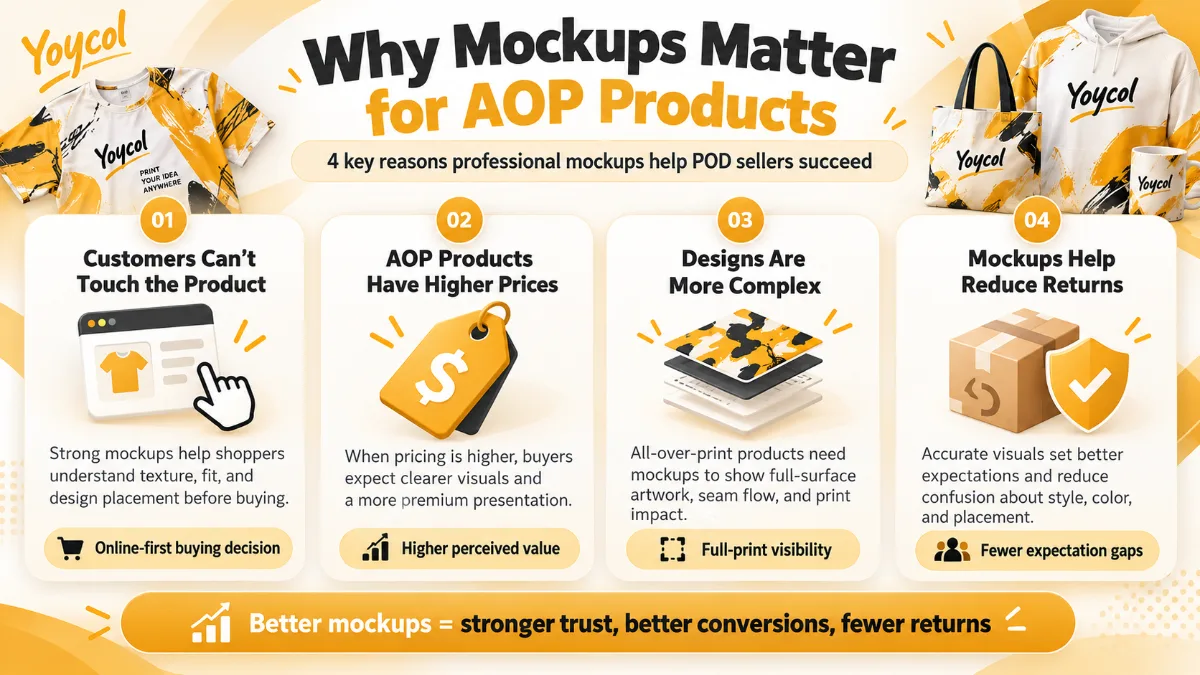
All-over-print products have unique presentation challenges that make mockups even more critical:
1. Customers Can't "Feel" the Product
Unlike shopping in a store, online buyers can't touch, stretch, or examine your product. Mockups are their only window into what they'll receive.
For AOP products, this is especially important because:
- Pattern scale matters — Customers need to see if the design is too large or too small
- Seam alignment — Buyers want to know if patterns match up at the seams
- Color vibrancy — AOP relies on bold, vibrant prints that need to look accurate
- Fabric drape — Customers need to understand how the design looks when worn
2. AOP Has Higher Price Points
AOP products typically cost 20-50% more than standard printed items. Customers paying premium prices expect premium presentation.
| Product Type | Standard Print Price | AOP Price | Mockup Quality Needed |
|---|---|---|---|
| T-shirt | $20–$30 | $30–$50 | High |
| Hoodie | $40–$55 | $55–$80 | Very High |
| Leggings | $30–$45 | $45–$65 | High |
| Blanket | $35–$50 | $50–$75 | Very High |
3. AOP Designs Are More Complex
Simple logos or text designs are easy to mock up. But AOP patterns require:
- Pattern repetition — Showing how designs tile and repeat
- 3D visualization — Demonstrating how patterns wrap around products
- Scale accuracy — Ensuring design elements look proportional
- Multiple angles — Front, back, side, and detail views
4. Mockups Reduce Returns
Poor mockups lead to mismatched expectations, which lead to returns. For AOP products, common return reasons include:
- "Colors looked different online"
- "Pattern was too small/large"
- "Design didn't match up at seams"
Professional mockups that accurately represent the final product can reduce return rates by 30-50%.
The Best Tools for Creating AOP Mockups
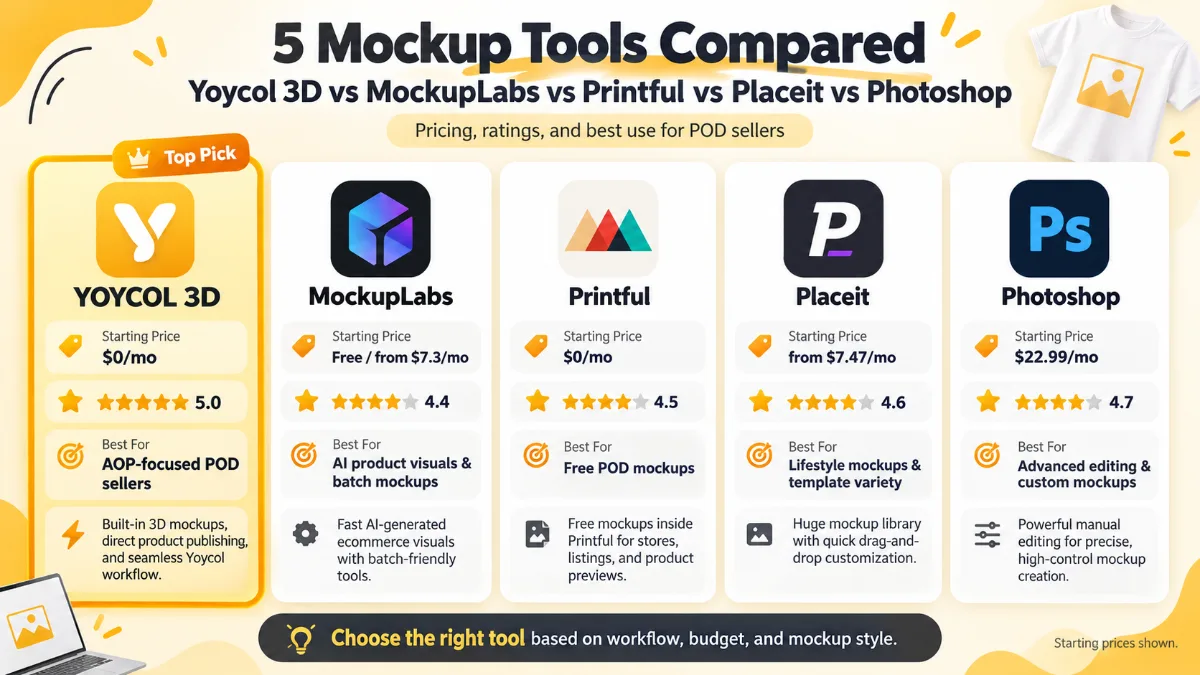
Here are the top tools for creating all-over-print mockups, ranked by ease of use and quality:
1. Yoycol 3D Mockup Generator (Best Overall)
Cost: Free Best for: Quick, professional mockups of Yoycol products
Features:
- Real-time 3D preview
- Automatic pattern placement
- Multiple angle views
- Direct integration with Yoycol product catalog
- No design skills required
Pros:
- ✅ Free
- ✅ Specifically designed for AOP
- ✅ Accurate product representation
- ✅ Fast and easy to use
Cons:
- ❌ Limited to Yoycol products only
- ❌ Less customization than professional tools
Website: Yoycol 3D Mockup Tool
2. MockupLabs.ai (Best for Customization)
Cost: Paid ($19-$49/month) Best for: Sellers who want maximum control over mockup presentation
Features:
- Upload your own product photos
- AI-powered pattern placement
- Adjustable pattern scale and rotation
- Realistic fabric texture simulation
- Batch processing for multiple products
Pros:
- ✅ Highly customizable
- ✅ Works with any product
- ✅ Realistic results
- ✅ Fast processing
Cons:
- ❌ Monthly subscription
- ❌ Learning curve for advanced features
Website: MockupLabs.ai
3. Printful Mockup Generator (Best Free Alternative)
Cost: Free Best for: Sellers using Printful or similar platforms
Features:
- Wide product catalog
- Lifestyle mockup templates
- Easy drag-and-drop interface
- Multiple background options
Pros:
- ✅ Free
- ✅ Large product selection
- ✅ Professional templates
- ✅ No design skills needed
Cons:
- ❌ Limited AOP-specific features
- ❌ Generic look (many sellers use same templates)
Website: Printful Mockup Generator
4. Placeit by Envato (Best for Lifestyle Mockups)
Cost: Paid ($14.95/month or $89.95/year) Best for: Creating lifestyle and model mockups
Features:
- 10,000+ mockup templates
- Model and lifestyle scenes
- Video mockup options
- Easy customization
Pros:
- ✅ Huge template library
- ✅ Professional quality
- ✅ Great for social media
- ✅ Easy to use
Cons:
- ❌ Subscription required
- ❌ Not specifically designed for AOP
Website: Placeit
5. Adobe Photoshop (Best for Professionals)
Cost: $22.99/month Best for: Sellers who want complete control and have design skills
Features:
- Unlimited customization
- Smart object mockups
- Advanced editing capabilities
- Professional-grade results
Pros:
- ✅ Maximum flexibility
- ✅ Professional results
- ✅ Industry standard
- ✅ One-time learning = lifetime use
Cons:
- ❌ Expensive
- ❌ Steep learning curve
- ❌ Time-consuming
Website: Adobe Photoshop
Tool Comparison Summary
| Tool | Cost | Ease of Use | AOP-Specific | Best For |
|---|---|---|---|---|
| Yoycol 3D Mockup | Free | ★★★★★ | ✅ Yes | Quick, accurate mockups |
| MockupLabs.ai | $19-49/mo | ★★★★☆ | ✅ Yes | Customization |
| Printful Generator | Free | ★★★★★ | ❌ No | Beginners |
| Placeit | $14.95/mo | ★★★★☆ | ❌ No | Lifestyle mockups |
| Photoshop | $22.99/mo | ★★☆☆☆ | ❌ No | Professionals |
How to Create Professional AOP Mockups: Step-by-Step
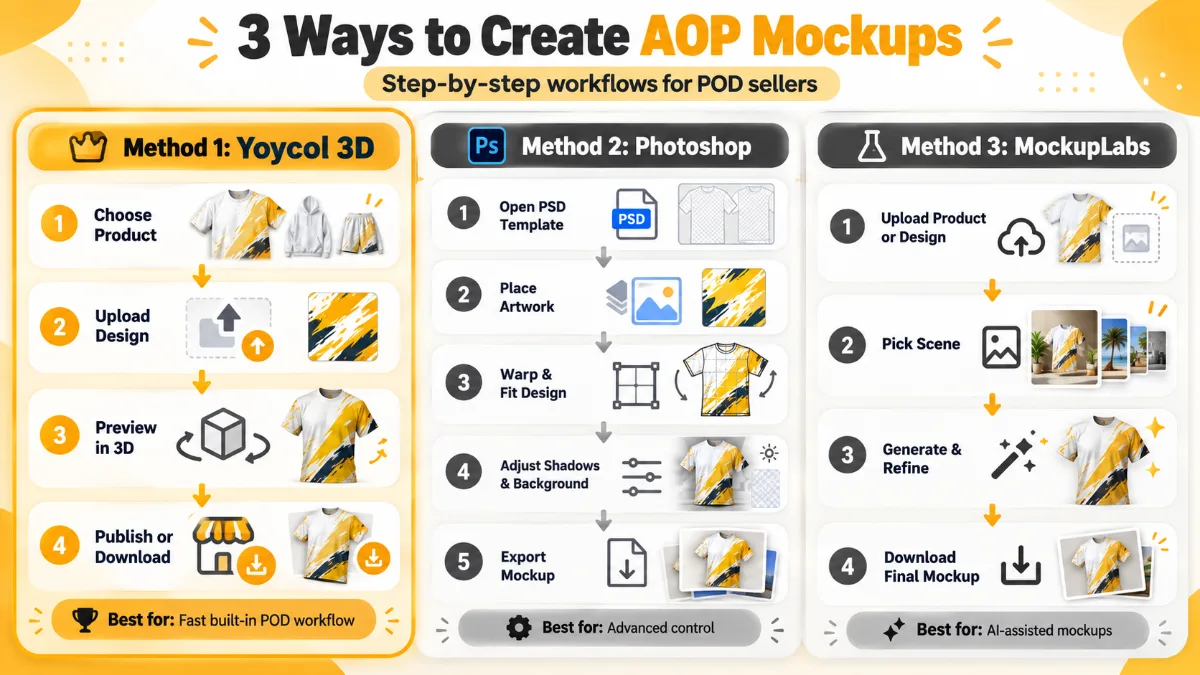
Method 1: Using Yoycol 3D Mockup Generator (Recommended)
Time required: 2-5 minutes per mockup
Step 1: Upload Your Design
- Go to Yoycol 3D Mockup Tool
- Select the product you want to mock up
- Upload your AOP design file (PNG, 300 DPI, RGB)
Step 2: Adjust Pattern Placement
- Use the tool to position your design
- Adjust scale to ensure patterns look proportional
- Check that designs align properly at seams
Step 3: Choose Your Angle
- Select front view, back view, or side view
- For best results, create 3-5 different angles
- Include at least one lifestyle/model shot if available
Step 4: Download and Use
- Download high-resolution mockup (PNG or JPEG)
- Use in your product listings, social media, or marketing materials
Method 2: Using Photoshop with Smart Objects
Time required: 15-30 minutes per mockup (first time), 5-10 minutes (subsequent)
Step 1: Find or Create a Mockup Template
- Download a PSD mockup template (free templates available online)
- Or create your own using product photos
Step 2: Set Up Smart Objects
- Open the PSD file
- Locate the smart object layer (usually labeled "Your Design Here")
- Double-click to open the smart object
Step 3: Place Your Design
- Paste your AOP design into the smart object
- Adjust size and position
- Save and close the smart object
Step 4: Adjust Blending and Perspective
- Apply blending modes if needed (usually "Multiply" or "Normal")
- Use warp or perspective tools to match the product shape
- Add shadows and highlights for realism
Step 5: Export Final Mockup
- Save as PNG or JPEG
- Export at high resolution (300 DPI for print, 72 DPI for web)
- Create multiple versions for different uses
Method 3: Using MockupLabs.ai
Time required: 3-5 minutes per mockup
Step 1: Upload Product Photo
- Take or download a product photo
- Upload to MockupLabs.ai
Step 2: Upload Your Design
- Upload your AOP design file
- The AI will automatically detect pattern repeat
Step 3: Adjust Settings
- Fine-tune pattern scale and rotation
- Adjust fabric texture and lighting
- Preview in real-time
Step 4: Generate and Download
- Click "Generate Mockup"
- Download high-resolution image
- Use immediately in your listings
Mockup Best Practices for AOP Products
1. Show Multiple Angles
Don't just show the front view. Customers want to see:
- Front view
- Back view
- Side view (for apparel)
- Close-up detail shots
- Lifestyle/model shots (if available)
Recommended: 6-10 images per product listing
2. Use Consistent Lighting
Poor lighting makes even great designs look bad. Ensure:
- Even, diffused lighting (no harsh shadows)
- Accurate color representation
- Consistent lighting across all mockups in your shop
3. Show Scale Accurately
Customers need to understand pattern scale. Include:
- Full product view showing overall pattern
- Close-up detail showing pattern repeat
- Size reference (model wearing product, or product next to common object)
4. Include Lifestyle Shots
Help customers visualize using your product:
- Model wearing the product (if applicable)
- Product in use (blanket on couch, apron in kitchen)
- Styled scenes that match your target audience
5. Optimize for Different Platforms
Different platforms have different requirements:
| Platform | Recommended Size | Format | Notes |
|---|---|---|---|
| Etsy | 2000 x 2000 px (square) | JPEG | First image is most important |
| Shopify | 2048 x 2048 px (square) | JPEG or PNG | Allow zoom functionality |
| 1080 x 1080 px (square) or 1080 x 1350 px (portrait) | JPEG | Focus on lifestyle shots | |
| 1000 x 1500 px (vertical) | JPEG | Tall images perform better |
6. Avoid These Common Mistakes
❌ Stretching designs unnaturally — Patterns should follow fabric drape naturally ❌ Ignoring seam alignment — Show how patterns match at seams ❌ Using low-resolution images — Always use 300 DPI or higher ❌ Over-editing colors — Keep colors accurate to the final product ❌ Showing only one angle — Customers want to see the full product
How to Use Mockups Effectively
For Product Listings
- First image: Clean, professional product shot on white background
- Images 2-4: Different angles showing full design
- Images 5-6: Close-up details showing pattern quality
- Images 7-8: Lifestyle shots showing product in use
- Images 9-10: Size chart, care instructions, or brand story
For Social Media Marketing
- Instagram: Lifestyle shots, behind-the-scenes, customer photos
- Pinterest: Tall vertical mockups, styled scenes, gift guides
- Facebook: Product launches, promotions, customer testimonials
- TikTok: Video mockups, design process, unboxing videos
For Email Marketing
- New product launches: Showcase 3-5 different angles
- Seasonal promotions: Lifestyle mockups in seasonal settings
- Customer stories: Feature customer photos with your products
Frequently Asked Questions
Do I need to buy real products to create mockups? No. 3D mockup generators like Yoycol's tool create realistic product images without requiring physical samples. However, ordering samples for photography can add authenticity to your marketing.
What's the difference between a mockup and a product photo? Mockups are digitally created images showing how a design will look on a product. Product photos are actual photographs of the finished product. Mockups are faster and cheaper to create; product photos are more authentic but require physical samples.
Can I use mockups for commercial purposes? Yes, most mockup tools (including Yoycol's) allow commercial use. Always check the tool's terms of service, but generally, mockups created for your own products are fine to use in listings and marketing.
How many mockups do I need per product? Aim for 6-10 images per product listing: 1 main product shot, 3-4 different angles, 2-3 close-up details, and 1-2 lifestyle shots.
What's the best mockup tool for beginners? Yoycol's 3D Mockup Generator is the easiest for beginners — it's free, specifically designed for AOP products, and requires no design skills. Just upload your design and the tool handles the rest.
How do I make mockups look realistic? Use high-resolution designs (300 DPI), ensure accurate color representation, show multiple angles, include lifestyle shots, and avoid over-editing. Tools like Yoycol's 3D Mockup Generator automatically handle realism for you.
Professional mockups are non-negotiable for successful AOP product sales. They're the bridge between your design and your customer's purchase decision.
With free tools like Yoycol's 3D Mockup Generator, there's no excuse for poor presentation. Invest time in creating high-quality mockups, and you'll see the difference in your conversion rates.
Ready to create professional AOP mockups? Try Yoycol's free 3D Mockup Generator →
This guide is part of our all-over-print series. Learn about AOP design templates, the difference between 3D mockups vs real samples, or explore how to design for sublimation.