Starting a print on demand store in 2026 is one of the lowest-risk ways to launch an online business — but low risk doesn't mean effortless. The sellers who succeed aren't the ones who slap random designs on T-shirts and wait. They're the ones who set up strategically from day one.
This guide is your complete blueprint. We'll walk you through every step — from choosing your niche and picking your platform, to finding the right supplier, designing your first products, and making your first sale. Whether you're starting from absolute zero or pivoting from another e-commerce model, you'll finish this guide with a clear action plan.
Let's build your store.
What You'll Need Before You Start
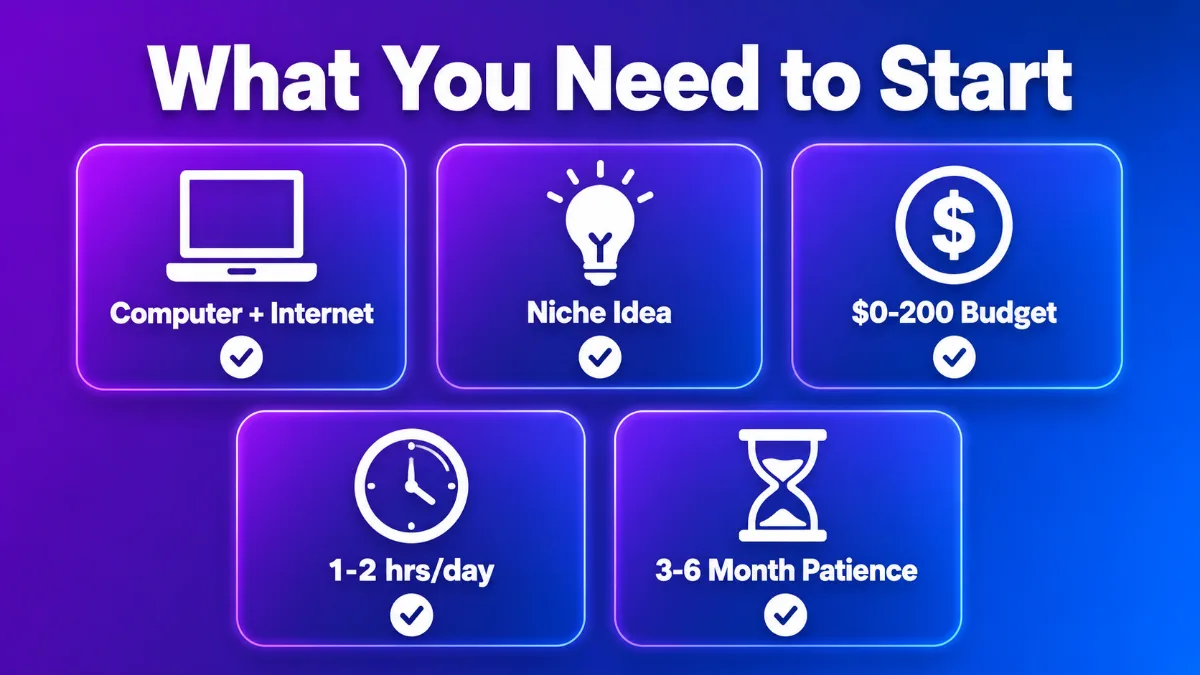
Before diving in, here's what you need. It's less than you think:
- A computer and internet connection — that's it for hardware
- A niche idea — even a rough one is fine; we'll refine it below
- A small budget — $0–$200 to start (or more if you want Shopify + samples)
- Time — 1–2 hours/day for setup; ongoing effort after launch
- Patience — 3–6 months to meaningful income is normal
That's it. No warehouse, no inventory, no business license required in most places (check local laws). You can literally launch your store this weekend.
Step 1: Choose Your Niche (Don't Skip This)
Your niche is the foundation of everything that follows. A store without a niche is a store without an audience.
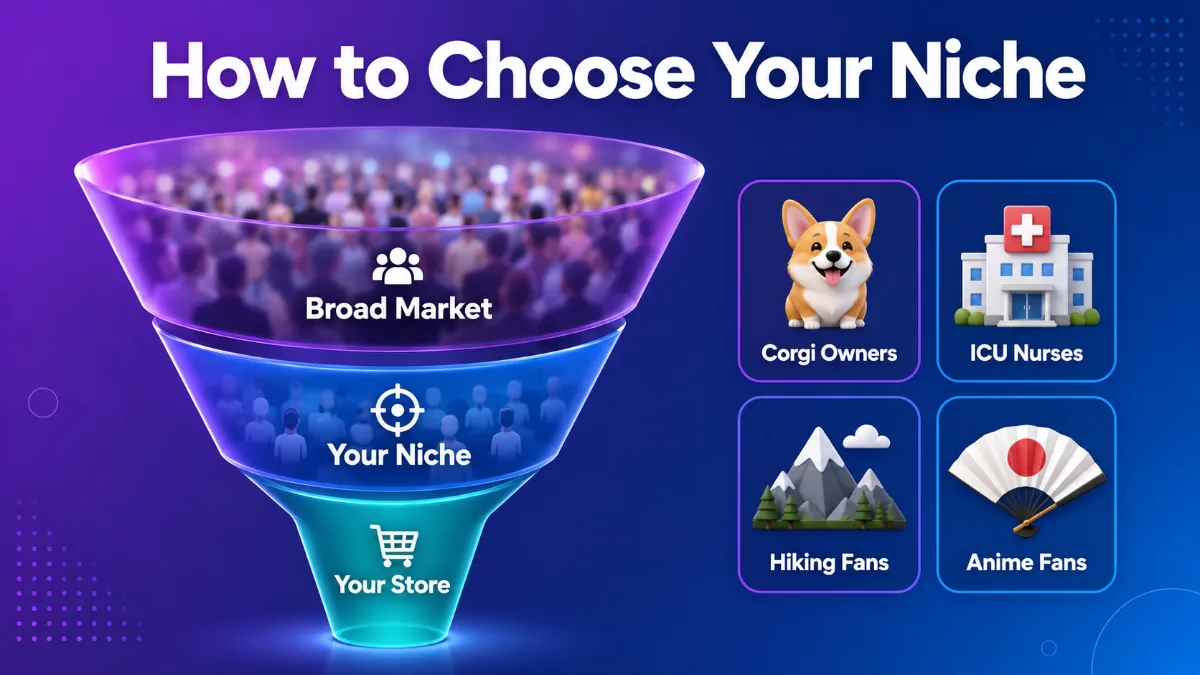
A niche is a specific group of people with shared interests, identities, or needs. The more specific, the better.
Why Niches Matter
- SEO advantage: Google and Etsy rank stores that are about something specific, not stores that sell everything.
- Marketing efficiency: You know exactly who to target on social media, in ads, and in your content.
- Design direction: Your niche tells you what designs to create.
- Customer loyalty: People buy from stores that "get" them.
How to Choose
Ask yourself:
- What communities do I understand or belong to? The best niches come from real knowledge. Pet owners, fitness enthusiasts, specific professions, hobbies, fandoms.
- What's selling on Etsy right now? Search "[topic] + t-shirt" or "[topic] + hoodie" and see the competition. Look for niches with demand but not identical-looking listings.
- Can I make 50+ designs for this niche? If you run out of ideas fast, the niche is too narrow. If you can't think of 50 designs, go broader or pick a different one.
Strong Niche Examples
| Niche | Why It Works |
|---|---|
| Corgi owners | Passionate, breed-specific, gift-friendly |
| ICU nurses | Profession pride, humor, year-round demand |
| Hiking & national parks | Lifestyle identity, seasonal + evergreen |
| Anime fans (specific shows) | Massive, engaged, willing to pay |
| Cottagecore aesthetic | Visual niche, strong Pinterest presence |
Niche Examples to Avoid
- "Funny T-shirts" (too broad, impossible to differentiate)
- "Motivational mugs" (extremely saturated, race to the bottom)
- Anything trademarked (Disney, Marvel, sports teams — legal risk)
Pro tip: If you can describe your target customer in one sentence ("30-year-old corgi owners who love hiking"), your niche is specific enough.
Step 2: Choose Your Sales Platform
Where will your store live? This decision affects your traffic, fees, and flexibility.
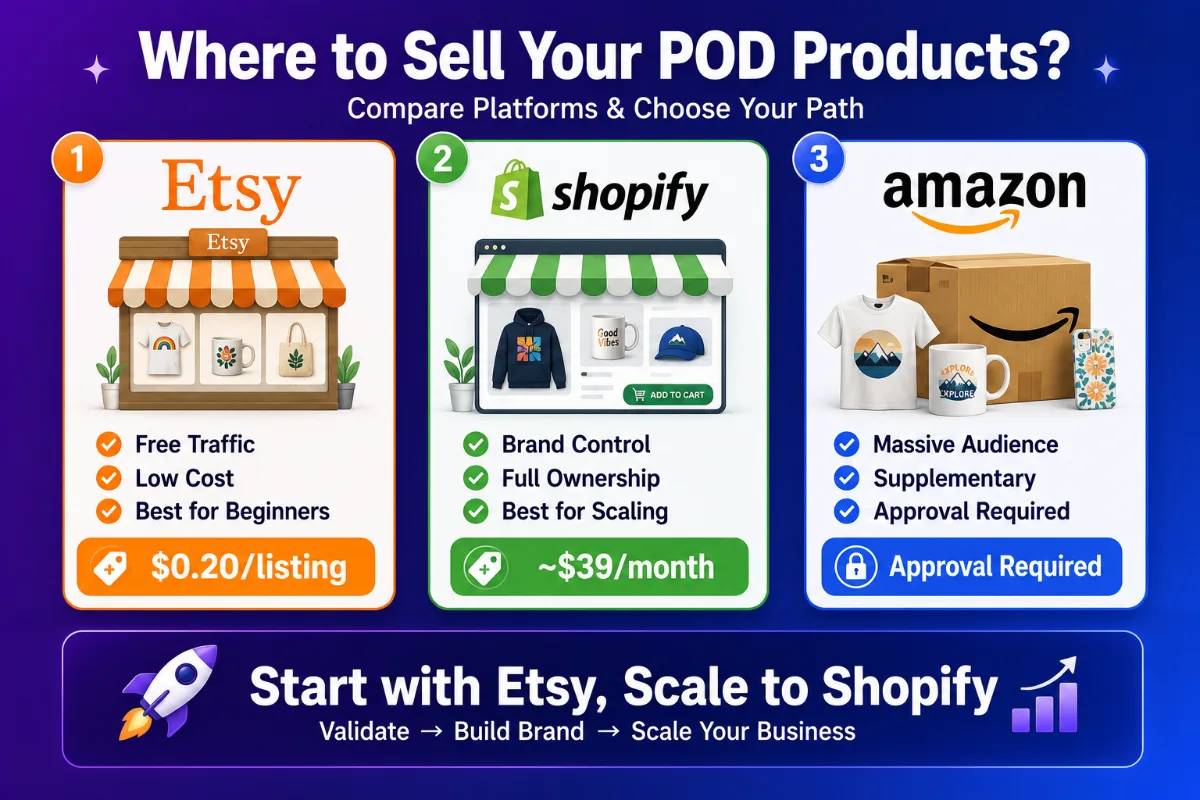
The Big Three for POD Sellers
Etsy — The best starting point for most beginners.
| Pros | Cons |
|---|---|
| Built-in marketplace traffic (millions of buyers) | Listing fees ($0.20 each) |
| Low startup cost | ~6.5% transaction fee |
| SEO built into the platform | Limited branding control |
| Perfect for handmade/creative products | Competition within Etsy |
Best for: Beginners who want traffic without running ads. Lowest barrier to entry.
Shopify — The best choice for building a long-term brand.
| Pros | Cons |
|---|---|
| Full control over branding | ~$39/month subscription |
| No marketplace competition | You drive your own traffic |
| Scalable with apps and integrations | More setup required |
| Own your customer data | Marketing skills needed |
Best for: Sellers ready to build a brand and drive their own traffic (SEO, social, ads).
Amazon Merch / KDP — The massive marketplace option.
| Pros | Cons |
|---|---|
| World's largest marketplace | Strict approval process |
| Massive organic traffic | Intense competition |
| Prime shipping available | Limited product customization |
| Good supplementary channel | Amazon controls the relationship |
Best for: As a supplementary channel, not your primary store. Apply for Amazon Merch while building your main store elsewhere.
Which Should You Pick?
If you're a beginner: Start with Etsy. Free traffic + low cost = the easiest way to validate your niche and designs.
If you want to build a brand: Go with Shopify from the start. You own the experience and the customer relationship.
The power move: Many successful sellers start on Etsy, validate their niche, then expand to Shopify for brand building. Use both as you grow.
Step 3: Choose Your POD Supplier
Your supplier is your business partner. Choose wisely — this decision affects your product quality, margins, shipping speed, and scalability.
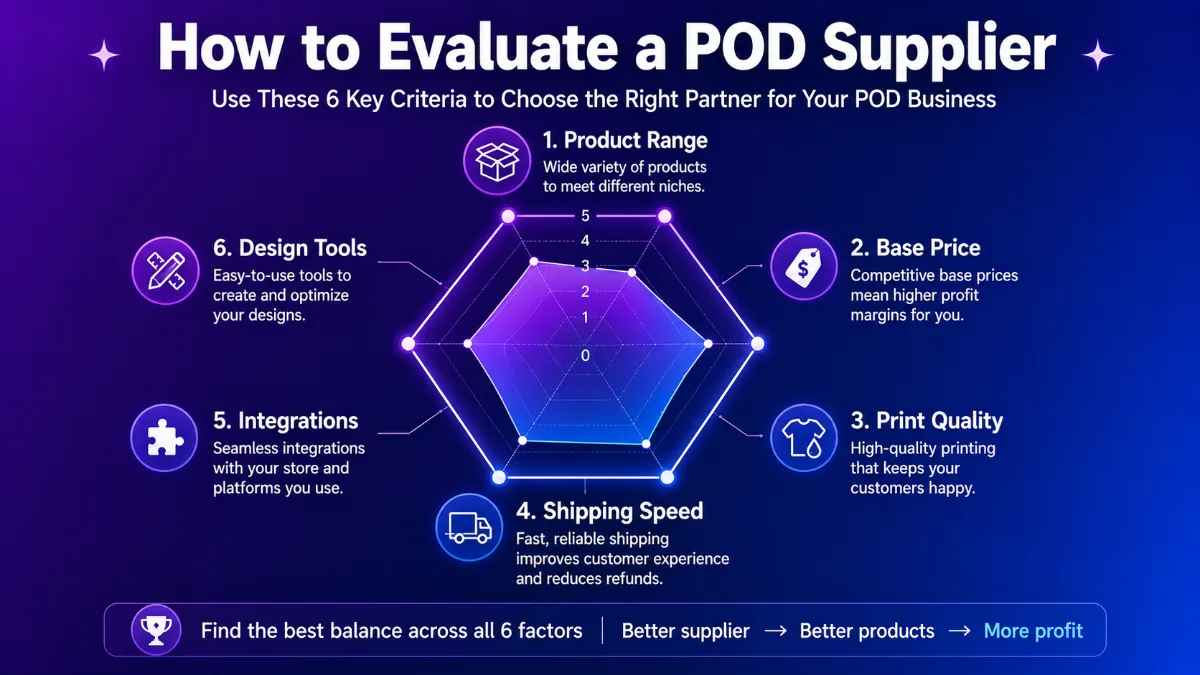
What to Evaluate
| Factor | Why It Matters |
|---|---|
| Product range | You need products that fit your niche |
| Base pricing | Lower costs = higher margins |
| Print quality | Consistent quality = fewer returns |
| Shipping speed | Faster = happier customers |
| Platform integrations | Must connect to your sales platform |
| Design tools | Good tools save time and improve quality |
Top POD Suppliers for Different Needs
Yoycol — Best for all-over-print and widest product selection.
- 1,600+ AOP products — the largest AOP catalog in the industry
- Free 3D design tools — preview your designs before listing
- No minimum orders — start with one product
- Global fulfillment — ships worldwide
- Integrates with Shopify, Etsy, WooCommerce
Yoycol is the best choice if you want to differentiate with premium all-over-print products that command higher prices and face less competition. Our complete All-Over-Print guide explains why AOP is the smartest product strategy for POD sellers.
Printful — Best for branding tools and fast US/EU shipping.
- Premium brand-building features (custom packaging, branded slips)
- US and EU fulfillment centers for fast domestic shipping
- Higher base costs than competitors
- Smaller AOP selection (~30–40 items)
Printify — Best for comparing multiple supplier prices.
- Marketplace model with competing providers
- Variable quality between providers
- Good for price-sensitive sellers willing to manage multiple suppliers
Our Recommendation
For most new sellers, we recommend starting with Yoycol if you want to stand out with premium AOP products, or Printful/Printify if you prefer traditional DTG basics. The product choice shapes your entire brand.
Ready to browse products? Explore Yoycol's 1,600+ AOP catalog →
Step 4: Set Up Your Store (Platform by Platform)
The setup process varies by platform. Here's the essentials for each.
Setting Up on Etsy
- Create an Etsy account → etsy.com/sell
- Open your shop — pick a shop name that reflects your niche (you can change it once)
- Set up payment — connect your bank account for payouts
- Configure shipping profiles — set shipping costs and processing times
- Create your first listing — upload product photos, write title/description, set price
- Fill your shop policies — returns, exchanges, privacy (Etsy requires these)
- Add your shop banner and logo — even basic branding helps you stand out
Key Etsy optimization: Your listing title and tags determine whether you get found. Research keywords in your niche using Etsy search autocomplete and tools like eRank or Marmalead.
Setting Up on Shopify
- Sign up for Shopify → shopify.com (free trial available)
- Choose a theme — free themes like Dawn work great for POD stores
- Set up your domain — buy a custom domain (~$14/year) for professionalism
- Install a POD app — connect Yoycol's Shopify integration for automatic order fulfillment
- Configure payments — set up Shopify Payments or your preferred gateway
- Set shipping rates — offer free shipping over a threshold to increase average order value
- Create your first product — import from your POD supplier or create manually
- Customize your store — add your logo, brand colors, about page, and policies
Key Shopify optimization: Invest in SEO from day one. Optimize product page titles, descriptions, and meta tags. Start a blog to drive organic traffic.
Setting Up on Amazon Merch
- Apply for Amazon Merch on Demand — approval required (can take weeks)
- Upload designs — follow Amazon's strict content guidelines
- Set prices — Amazon takes a royalty cut
- Let Amazon handle the rest — they print, ship, and manage customer service
Key Amazon optimization: Focus on keyword-rich titles and bullet points. Amazon's search algorithm rewards relevance and sales velocity.
Step 5: Create Your First Designs
You don't need to be a designer. Here are your options:
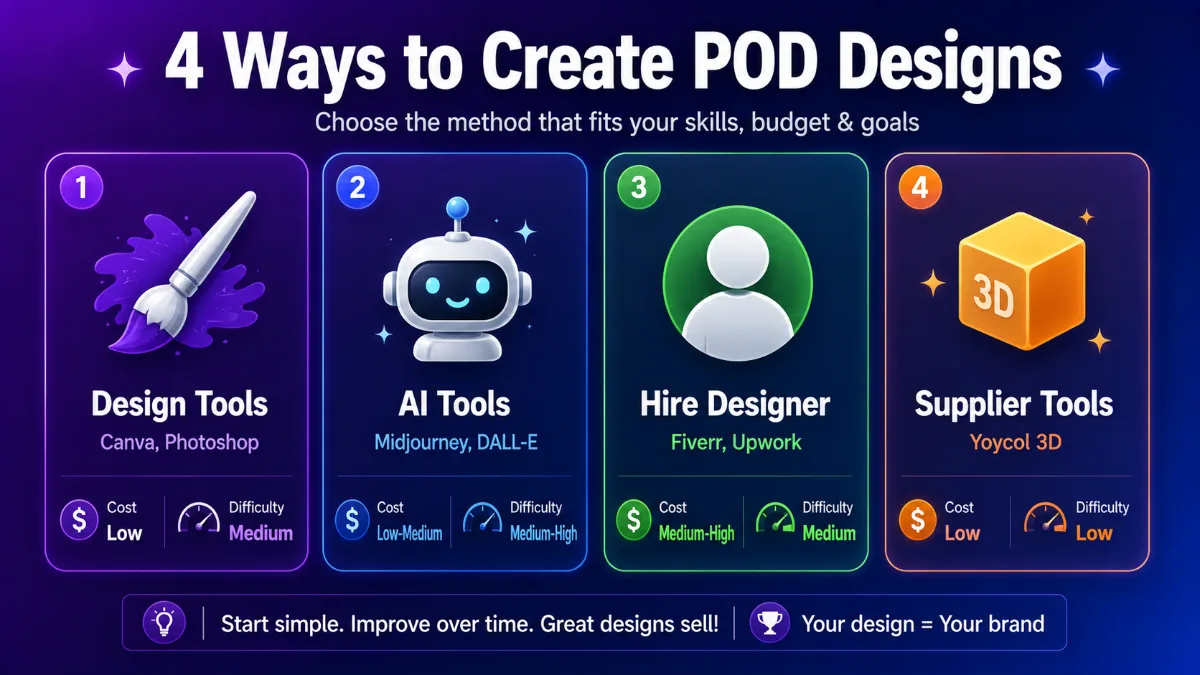
Option A: Use Design Tools
- Canva — Free tier is surprisingly capable. Pro ($13/month) unlocks premium assets.
- Photopea — Free browser-based Photoshop alternative.
- GIMP — Free open-source image editor.
- Photoshop/Illustrator — Professional tools if you have the skills and budget.
Option B: Use AI Tools
- Midjourney — Excellent for generating artwork from text prompts.
- DALL-E — Good for quick concept generation.
- Leonardo AI — Free tier with strong image generation.
- Always upscale AI output before printing — raw AI images are often too low-resolution.
Option C: Hire a Designer
- Fiverr — Budget designers from $5–$50 per design.
- Upwork — Mid-range freelancers, $20–$100 per design.
- 99designs — Premium, contest-based design, $200+.
Option D: Use Your POD Supplier's Tools
Yoycol provides free 3D design tools that let you:
- Upload artwork and map it onto products
- Preview designs in 3D before listing
- Ensure patterns align correctly across seams (for AOP)
- Generate mockup images for your listings
Design Principles That Sell
Regardless of how you create them, designs that sell share these traits:
- Simple > complex. The best-selling POD designs are often the simplest — a bold phrase, a clean illustration, a striking pattern.
- Readable text. If your design includes words, make them large and legible from a distance.
- Niche-specific. Generic designs don't sell. Designs that speak to a specific audience ("World's Okayest Corgi Dad") do.
- Test in mockups. Always preview your design on a real product before listing.
- Study competitors. Search your niche on Etsy and note what's selling. Don't copy — but learn.
Step 6: Price Your Products for Profit
Pricing is where most new sellers leave money on the table. Here's how to get it right.
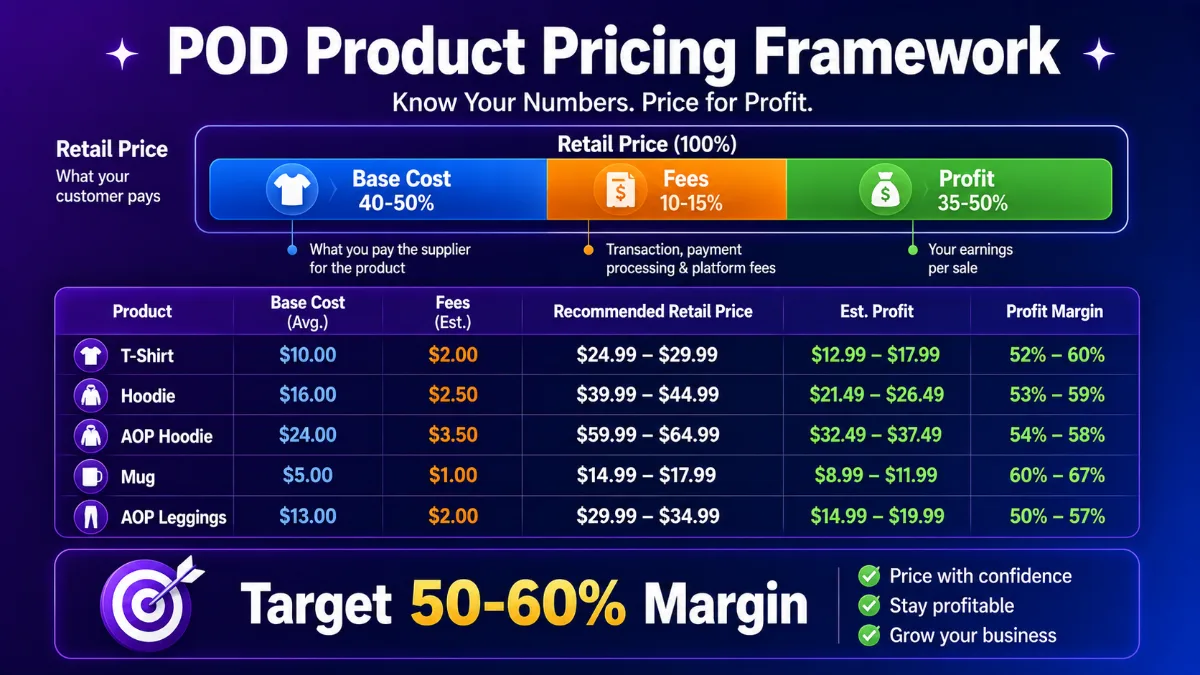
The Pricing Formula
Retail Price = Base Cost ÷ (1 − Target Margin)
Margin Targets
- Minimum viable: 40% gross margin
- Sweet spot: 50–60% gross margin
- Premium positioning: 60%+ gross margin
Real Pricing Examples
| Product | Base Cost | 50% Margin Price | Recommended Retail |
|---|---|---|---|
| Basic T-Shirt | $10 | $20 | $22–$28 |
| Standard Hoodie | $22 | $44 | $45–$55 |
| AOP Hoodie | $24 | $48 | $50–$65 |
| Mug | $7 | $14 | $15–$18 |
| AOP Leggings | $18 | $36 | $38–$45 |
Pricing Tips
- Don't compete on price. Racing to the bottom is a losing game. Compete on design and niche specificity instead.
- Check competitors. Search your niche on Etsy — what are similar products selling for? Price within that range or slightly above.
- Psychological pricing works. $24.99 outperforms $25. $49 outperforms $50. Test it.
- Premium products deserve premium prices. AOP items have higher perceived value — don't underprice them.
- Account for fees. Include platform fees (Etsy ~6.5%, payment processing ~3%) in your calculations.
Step 7: Launch and Optimize
Your store is set up, products are listed. Now what?
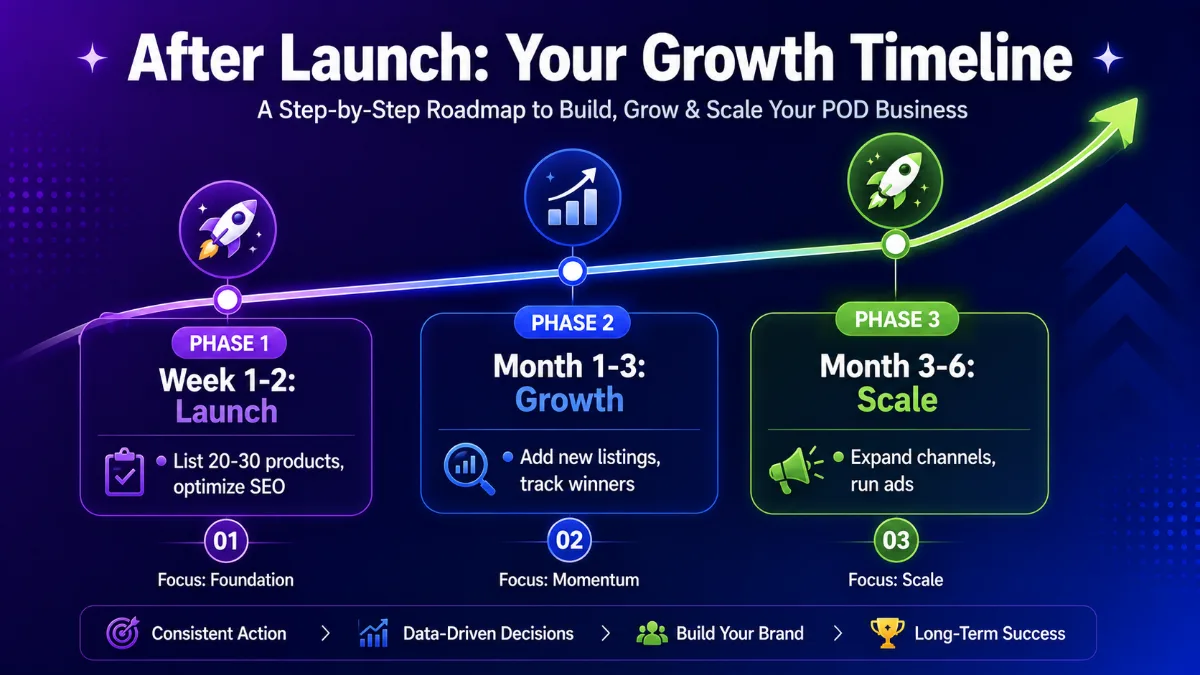
Week 1–2: Launch Phase
- List 20–30 products minimum. Don't launch with 5 listings. Volume matters for discovery.
- Optimize every listing. Keyword-rich titles, detailed descriptions, quality mockup photos.
- Set up social media. Create accounts on Instagram, Pinterest, and TikTok for your brand.
- Start pinning on Pinterest. Create 2–3 pins per product. Pinterest drives consistent, long-lifes traffic.
Month 1–3: Growth Phase
- Add new listings regularly. Aim for 5–10 new products per week.
- Track what works. Note which listings get views, favorites, and sales.
- Double down on winners. When a design sells, create 3–5 variations.
- Learn SEO deeply. Master your platform's search algorithm.
- Order samples. Before promoting heavily, hold your product in your hands.
Month 3–6: Scaling Phase
- Expand channels. Add Shopify if you started on Etsy, or vice versa.
- Start small ad campaigns. $1–$5/day on Etsy Ads or Facebook for your best sellers.
- Build an email list. Offer a discount for signups.
- Refine your niche. Drop what doesn't sell, go deeper on what does.
Ongoing: Optimization
- Update seasonal designs before each season/holiday
- Refresh listing photos periodically
- A/B test pricing on top sellers
- Collect and showcase reviews
Common Mistakes When Starting a POD Store
Learn from others so you don't repeat their mistakes:
- Starting without a niche. Generic stores don't get found. Pick a niche before anything else.
- Listing too few products. 10 listings won't cut it. Aim for 50+ within 3 months.
- Skipping SEO. If your listings aren't optimized for keywords, you're invisible.
- Underpricing. Low prices = low margins = a business that can't sustain itself.
- Copying bestsellers. The designs already selling have thousands of competitors. Be original.
- Giving up too early. The first 3 months are slow. Sellers who succeed push through.
- Ignoring mockups. Bad product photos kill conversions. Invest in quality mockups.
Your First 30 Days: Action Checklist
Here's your day-by-day plan to go from zero to a live, selling store:
Days 1–3: Foundation
- Choose your niche (write your target customer in one sentence)
- Pick your sales platform (Etsy recommended for beginners)
- Sign up for a POD supplier account (Yoycol, Printful, or Printify)
- Browse product catalogs and pick 3–5 products to start with
Days 4–7: Setup
- Set up your store (Etsy shop or Shopify store)
- Configure payments and shipping
- Add basic branding (logo, banner, about page)
- Connect your POD supplier to your store
Days 8–14: Design
- Create 10–15 designs using your chosen tools
- Preview each design on 3D mockups
- Upload designs to your POD supplier
- Order 1–2 samples of your best products
Days 15–21: List
- Create 15–20 listings with optimized titles, descriptions, and tags
- Set competitive prices using the margin formula
- Upload quality mockup photos (5+ images per listing)
- Fill all listing fields completely
Days 22–30: Launch
- Set up social media accounts (Instagram + Pinterest minimum)
- Start pinning products to Pinterest (2–3 pins per product)
- Share your store in niche communities (provide value, don't spam)
- Track views, favorites, and any sales
- Start planning your next batch of designs
Frequently Asked Questions
How much does it cost to start a print on demand store? You can start with $0–$200. Etsy costs $0.20/listing, POD supplier accounts are free, and design tools like Canva have free tiers. A Shopify store adds $39/month. Optional costs include sample orders ($20–$30 each) and a custom domain ($14/year).
How long does it take to set up a POD store? You can set up a basic store in 1–3 days. Creating a meaningful catalog (20–50 listings) takes 2–4 weeks of consistent effort. Reaching your first sale typically takes 1–4 weeks after launch, depending on your niche and SEO.
Do I need a business license for print on demand? In most places, you don't need a business license to start selling online. However, you should check local regulations, register for sales tax collection if required, and report your income on your taxes. Consult a local accountant for specific advice.
Which is better: Etsy or Shopify for POD? Etsy is better for beginners who want free marketplace traffic. Shopify is better for building a long-term brand with full control. Many successful sellers use both — Etsy to validate and build initial traction, Shopify to scale their brand.
Can I start a POD store with no design skills? Yes. You can use AI tools (Midjourney, DALL-E), free design tools (Canva), hire designers on Fiverr ($5–$50), or use your POD supplier's built-in design tools. Many successful POD sellers aren't designers — they're marketers who understand their niche.
What's the best POD supplier for beginners? It depends on your product strategy. Yoycol is best for sellers who want premium all-over-print products with the widest selection (1,600+ items). Printful is best for branding tools and fast US/EU shipping. Printify is best for comparing prices across multiple suppliers.
Your Next Step
You now have the complete blueprint to start your print on demand store. The only thing left is to actually do it.
Here's the honest truth: the difference between people who succeed and people who don't isn't talent or luck — it's starting. And then not stopping.
Your action items:
- Pick your niche today. One sentence: who are you selling to?
- Choose your platform. Etsy for beginners, Shopify for brand builders.
- Sign up for a supplier. Free accounts, no commitment.
- Create your first design. Use any tool — just start.
- List your first product. Imperfect action beats perfect inaction.
The best time to start was yesterday. The second best time is now.
Ready to launch your store? Create your free Yoycol account and start building →
This guide is the foundation of our store setup series. Explore our in-depth guides on selling POD on Etsy, setting up Shopify, and connecting Yoycol to your store.